How Pizza Tycoon simulated traffic on a 25 MHz CPU
Context
I've been working on Pizza Legacy, an open-source reimplementation of the 1994 DOS game Pizza Tycoon. The game has a close-zoom street view of the cities, and when you scroll around it you can see a steady stream of cars driving through the streets. Maybe 20 or 30 tiny sprites at a time, but they navigate the road network, queue behind each other at intersections, and generally look like a living city. Yes, it was a bit buggy because sometimes they would drive through each other, but it was good enough to just give some sense of life to the map. All that on a 25 MHz 386 CPU.
The first thing I implemented in 2010 when I started this project was that close zoom level, but it took 14 years before I finally had the cars driving around on it, in a way that I was happy about; I had multiple attempts over the years but every time I ran into problems I got stuck building an overly complicated system that was hard to reason about and no fun to work on.
One attempt in 2017 involved each tile keeping track of which positions were occupied, and every car had to ask the grid for permission before moving, reserving and freeing slots as it went. It basically turned into a shared locking system just to move a few pixels, with cars and tiles constantly trying to stay in sync.
All the while I had this nagging thought in the back of my mind: the original Pizza Tycoon ran this on a 25 MHz CPU, so why were my versions always so complicated?
Finally I went to the assembly (which I had spent many years slowly understanding better and documenting) to figure out what the original was doing, with the help of LLMs which were (a couple of years ago) this new and exciting technology that could better understand assembly than I could.
Now that I finally have it working I can see where I went wrong: I went into it with a brain full of modern concepts: scene graphs, path finding, collision detection, and of course plenty of CPU to run it all!
Cities
First, let's look at what a city actually looks like:
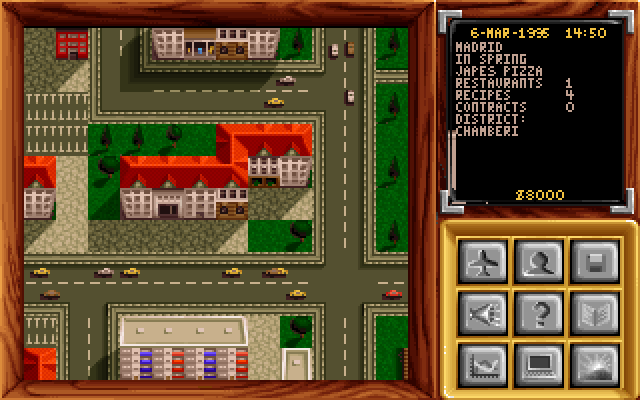
As you can see there are two-lane roads, T-junctions, intersections, and corners. In Pizza Tycoon maps are made up out of a grid of 160 by 120 tiles, where each tile is one of the tiles from landsym.vga:
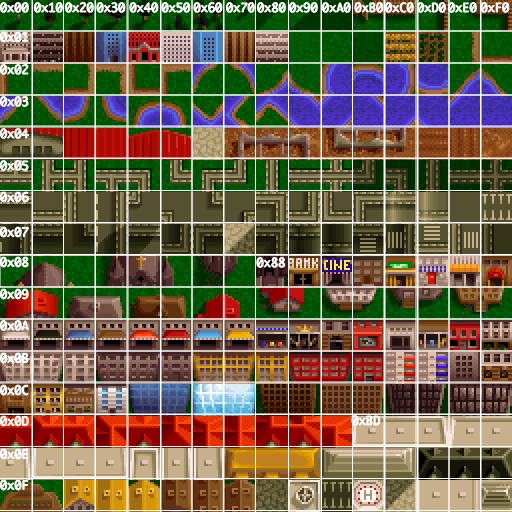
The original landsym.vga file with added
borders between tiles and text to indicate the row and column
offset. Byte 0x54 means column 5, row 4 (roof tile
of a depot).
Road system
Back to the traffic; the key insight that makes it possible
to run this system on such a slow CPU: cars don't need to know
where they're going. Each road tile type carries its own direction.
Road tile 0x16 is the bottom part of a horizontal
road, meaning that cars can only drive from left to right on these
roads. Similarly road tile 0x06 is just for right to
left traffic, then 0x26 and 0x36 are the
same but for vertical traffic.
This means the city is basically just a bunch of one-way roads, once a car knows which tile it sits on, it can keep going.
Corners work the same way, 0x56
(CORNER_SW in my enum) is the corner that allows the
car to either keep going west, or turn south. When a car hits a
corner it flips a coin, 50% chance of going straight on, 50% chance
of taking the turn. The maps have been designed in such a way that
the roads always make sense, which means that next to the CORNER_SW
there is another tile that is either a south to north traffic (so
we have to go south) or it's another edge tile that allows either a
turn or straight on.
There is one extra rule to keep traffic looking natural, if you just took a left turn the next corner forces you straight-on; no two consecutive left turns.
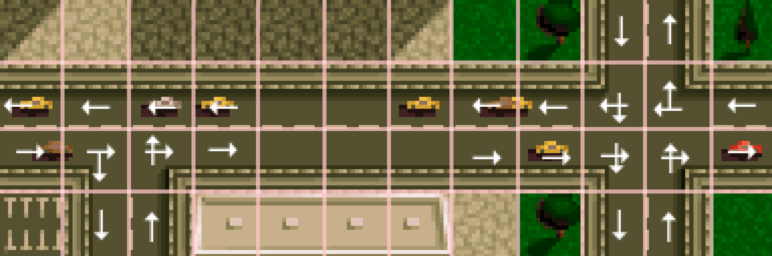
Valid directions per tile type indicated with arrows.
Movement: one pixel per tick
Cars move one pixel per frame. Each tick the main loop checks if a car is blocked, and if not, increments or decrements its screen coordinate by one depending on direction. East adds 1 to X. North subtracts 1 from Y.
There's a second progress counter, counting down from
16 to 1. When it hits zero it resets to 16 and the game runs the
tile-boundary logic: look up the next tile, decide the new direction,
update the sprite frame (to visually turn the car in the new
direction). Since each tile is 16 pixels wide and tall, this runs exactly once
per tile crossed. The per-pixel move happens every tick;
the heavier tile logic runs only 1/16th as often.
When a car first spawns, progress is set to a random
value between 1 and 16. That staggers all the cars so their
tile-boundary checks don't all land on the same frame, spreading the work
out evenly.
Collision detection: cheap O(n²)
Unlike my various attempts at fancy collision detection, the original uses a straightforward pairwise check: for each car, walk the whole car list and ask "would these two overlap next tick?" If yes, set a wait counter of 10 ticks on the blocked car and move on to the next car.
But the collision detection code is written to bail out as fast as possible. The very first thing it does is extract the other car's direction; because roads are one-way, east and west never share a road, so an east car and a west car can never collide. That pair returns immediately, no coordinate reads at all. Same for east and south, west and north, and so on.
With say 25 cars in a typical city view there are 625 pairwise calls per frame. About half of those return in just a few CPU instructions on the direction check alone. Most of the rest fail the lane check (same-direction cars have to be on the same road, which is one equality comparison). The pairs that actually reach any coordinate arithmetic are usually single digits.
When a car does get blocked, the 10-tick wait creates natural traffic jams: cars bunch up, the front one eventually finds the way clear, the queue drains. There are some bugs in the system (especially when you let it run for a while and there are lot of intersections) but given that the point of this is not to run an accurate driving simulation but just show some movement on the screen, it works perfectly well and very efficiently. The collision detection system has some quirks; some combinations are never checked (e.g. eastbound car never intersects with a southbound car) that might be the reason behind some buginess.
Spawning
When you enter the close-zoom view, the game scans all 132 tiles in the viewport (12 columns by 11 rows), and for each road tile it rolls against the district's traffic density to decide whether to spawn a car there, so higher-traffic districts are busier. Corner tiles are excluded from spawn points, so cars only appear on straight road tiles.
Cars that drive off the edge of the screen are respawned as a new (random) color car facing the other direction, on the tile going the other direction. This means that the game doesn't have to worry about respawning cars other than just every time one car drives of going east it spawns a new car below going west, etc.
Pay attention to the cars driving off the map at the edges, notice they are replaced by cars driving the opposite direction.
When you scroll, the newly exposed strip of tiles gets the same treatment of having a chance of having cars spawned on them.
Why it works
Looking back at my failed attempts, I was designing for problems that the original just didn't consider. Cars don't need pathfinding because the map tells them where they can go. Collision detection was cheap because the early-exit logic makes most pairs basically free. There's no velocity or physics because 1 pixel per tick is enough to look convincing. When you're about to hit something just pause for 10 ticks, and when you have to make a turn you just travel half the width of the tile and then make your turn, works on every tile in any direction.
I reimplemented it following the assembly pretty closely, so just
a couple of switch statements with different routing options per tile
type, you can see the decide_desired_direction method in
Car.cpp.