Bug hunt: Pizza Tycoon's missing pizza boxes
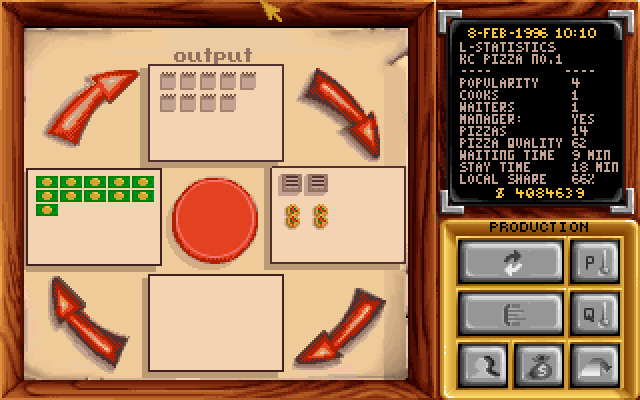
The latest release of Pizza Legacy, v1.0.0-beta.2, makes the Production screen match the original (except our pizza boxes aren't missing). Getting there involved figuring out exactly how the screen works, and what that empty box at the bottom is for.
The restaurant view in Pizza Tycoon has an
Animated stats
section where you can get various insights
into how that restaurant is doing, and the first one you land on is
the Production screen.
At the top it says output
, above a box with little order
slips, then an arrow to a box showing some ovens and pizzas,
another arrow to an empty box, an arrow to a box with bank notes,
and finally another arrow back to the first box with order
slips.
What exactly this was supposed to tell me was never clear: something with orders resulting in pizzas, then something empty and finally some amount of money being generated?
The original manual describes it like this (spoiler: don't believe it):
In the box at the top you can see the orders, on the right the ovens with their maximum throughput. The number of baked pizzas is shown at the bottom of the picture and the number of pizzas paid for is shown on the left.
So the bottom box should have shown the baked pizzas, but in my game it was always empty. The screenshot in the English manual doesn't help: it shows a closed restaurant. The German manual for Pizza Connection has a busier one, with a full grid of 15 order slips and a row of bank notes, and its bottom box is empty too.
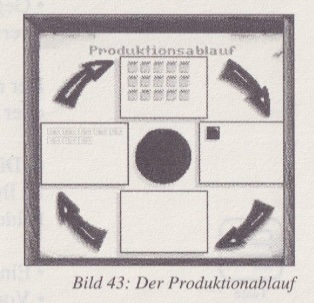
As I was working on Pizza Legacy, I had to understand the Production screen: first figure out what was supposed to be in that bottom box, then maybe add some tooltips to the four boxes that would help players understand it better.
Reading the assembly
Let's look at the assembly to see what is actually happening
when this screen gets drawn. IDA (the Interactive Disassembler)
calls this subroutine sub_35238, and it calls a
separate subroutine for each box. The bottom one is drawn by
sub_34F89, which gets a count and draws some shape
that many times, stacked from the bottom up. The count is
calculated from the restaurant's demand and how busy the waiters
are, and it's capped at 10.
Maybe the count is zero, or something goes wrong after that?
To find out I ran the game in Bochs, an x86 emulator
with a debugger, set a breakpoint on sub_34F89, and
opened the stats screen on one of my restaurants. The count is
passed in the EAX register, so I just had to read it
on entry, along with the two struct fields it's calculated
from:
<bochs> x /1hd esi+0x6f    ; demand_oven_limited
463
<bochs> x /1bd esi+0x7f    ; waiter_work %
87
<bochs> registers
...
eax: 0x00000008
...
The count was 8. Oven-limited demand was 463, the waiters were 87% busy, and that had produced 8 things to draw. The computation was fine, so the bug had to be in the drawing itself.
Drawing in the wrong place
Each item in sub_34F89 gets an (x, y)
position, and this is the part that calculates the x coordinate:
mov     esi, 0x52     ; 82, the x offset of a column
mov     edi, 0xB4     ; 180, the y (bottom) of where we start painting
...
loc_34FD0:            ; loop body, once per item i
...
idiv    ecx           ; ecx = 10, so eax = i / 10, edx = i % 10
movsx   edx, si       ; si is the low 16 bits of esi, so 82,
                      ; sign-extended back to 32 bits in edx
imul    eax, edx      ; x = (i / 10) * 82
cwde                  ; sign-extend ax to eax, x is a 16-bit value
push    eax           ; x
call    sub_34EE4     ; draw one item at (x, y)
We already saw that the count is always 10 or less, so the item
index i only ever goes from 0 to 9. With integer
division i / 10 is 0 for every one of those,
so x is 0 × 82 = 0 every
time. Every item is drawn at the very left of the screen, where the
wooden border goes. Since we never see them, the border is
presumably drawn on top of them afterwards.
The drawing code for the other boxes draws at sensible coordinates; the top one starts at x = 80, left at x = 18 and right at x = 142. Only the bottom one starts at x = 0. The value 82 is very close to where the order slips in the top box are drawn, so my guess is that 82 was meant as the starting x rather than the multiplier (plus a second column 82 px further to the right wouldn't fit inside the box anyway).
Patching the original PT.EXE
Now that we know what's wrong, wouldn't it be nice if we could see the shapes in the original game? We can work out from the assembly what exactly it's drawing (so I can replicate that in Pizza Legacy), but actually seeing it would be the definitive proof of what it is supposed to look like.
Instead of multiplying by 82 we just want x =
82, and since 82 is already in the si register, we can
replace the multiply with a move that copies it straight into
eax (which becomes x). In PT.EXE each
instruction is stored as a few bytes of machine code, shown in the
comments:
imul    eax, edx      ; before: 0F AF C2
movsx   eax, si       ; after:  0F BF C6
Both are three bytes (only two of them actually differ), so we can swap one for the other without having to worry about moving anything around. In the file the surrounding bytes are unique enough to search for:
Before: 0F BF D6 0F AF C2 98 50 E8
After:  0F BF D6 0F BF C6 98 50 E8
I patched my copy of PT.EXE, loaded a game, and behold: little pizza boxes!
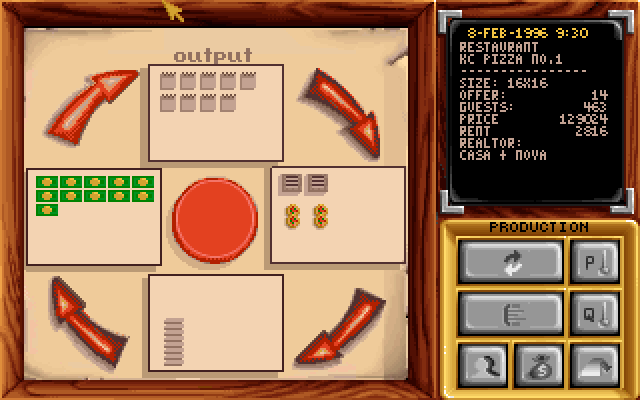
So what does it show?
Although we can now finally see the Production screen in all its intended glory, it didn't make the point of this screen any clearer to me. And the fact that across three releases on two platforms nobody noticed or bothered to fix the bug makes me think I'm not the only one who didn't use this screen :)
Luckily the game also has a Capacity screen that helps you figure out what is limiting your restaurant:
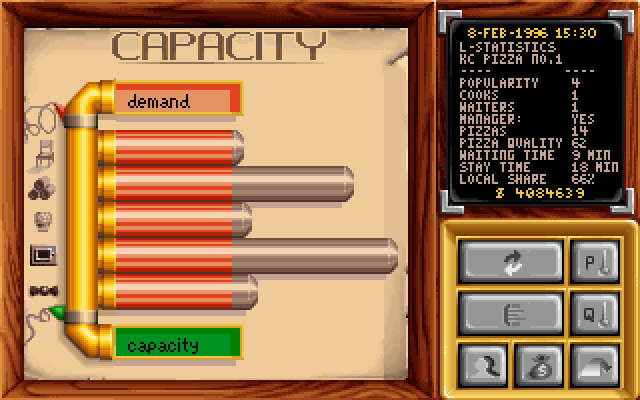
This shows the demand for a restaurant at the top, then five bars with your available capacity for seating, ingredients, kitchen staff, ovens, and waiting staff, and finally the overall capacity, set by the most restrictive row.
Each of the four boxes on the Production screen is a gauge for one of these stats (ingredients don't get a box of their own, see the order slips):
- (left) bank notes: how full your restaurant is
Each bank note is one customer sitting at a table at any given time: how many customers you get, times how long each one stays, spread over the day. It can't go above your number of seats, and stops at 20. - (top) order slips: how busy your chefs are
Of the customers that found a seat, how much of your chefs' capacity they use. It's squared, so it stays low for a long time and then shoots up: 50% busy gives 3 slips, 70% gives 5, and the most you'll ever see is 11. Technically it takes whichever is busier, your chefs or your ingredient stock, but the game sets your stock capacity to twice the forecast sales, so stock sits at around 50% and never gets a chance to influence this. - (right) pizzas under each oven: how busy your ovens are
One column per oven, for up to four ovens. A full column is how many pizzas that oven bakes in one go, and it fills up as your ovens get busier: two 6-pizza ovens at 50% busy show 3 pizzas each. - (bottom) pizza boxes: how busy your waiters are
Of the pizzas that came out of the ovens, how much of your waiters' capacity it takes to serve them, in tenths: 87% busy gives 8 boxes, up to 10.
That means the manual is wrong: the bank notes show how many customers are sitting in your restaurant, not how many pizzas are paid for.
Overall I think this shows us why this is not a useful screen; even with the full explanation of what each box shows it's still not informative in the least, at least nothing that the Capacity screen doesn't show you in one glance.
The screen in Pizza Legacy
In Pizza Legacy the screen is reimplemented from scratch and shows the same as the patched Pizza Tycoon, with tooltips on the four boxes. In v1.0.0-beta.2 those tooltips still use the manual's wording, but the next release will update them to say what the boxes actually show. Even so, I haven't yet found a way of actually making this screen worth looking at compared to the Capacity screen. If you have any suggestions on how this screen could be improved, let me know!
You can try v1.0.0-beta.2 yourself by going to the downloads section.